68 features for collecting, showing and managing product reviews. 47 of them are free; Rosette Reviews Pro adds 21 more.
Collect reviews
Ask every customer at the right moment and make it easy for them to answer.
Feature and what you getHow it worksFreePro
Review reminder emails
Customers get asked while the product is still new to them, and you never send a request by hand.
Sends a review request a set number of days after an order reaches the status you choose. Sends run on Action Scheduler, the queue WooCommerce itself uses. Each request is claimed before it goes out, so no customer is emailed twice for the same order.
FreeUnlimited
ProPlus two reminder steps, smart rules and campaigns
Follow-up reminders
Customers who missed the first email get one more nudge, and nobody who already reviewed is asked again.
One follow-up a set number of days after the first email, only to customers who still have something to review, with its own subject, text and preview. Pro adds a second reminder and its own delay, subject and text for each one. Switching a reminder off also stops the ones already waiting.
FreeOne follow-up
ProUp to two reminders
Send a request from the order screen
You ask a particular customer for a review the moment you know they are happy.
“Send review request” in an order’s Order actions, or as a bulk action on the orders list (up to 200 at a time). Works with automatic reminders off and never emails a customer twice within 20 hours.
FreeIncluded
ProIncluded
Leave products and customers out
Gift cards, samples and wholesale buyers stop getting review requests.
Exclude product categories (child categories included) or single products, and skip customers with chosen roles. Excluded items also drop out of review links sent earlier.
FreeIncluded
ProIncluded
Consent checkbox at checkout
Stores that need permission before emailing customers get it, and can prove it.
Off by default. An opt-in or opt-out checkbox on classic checkout and the Checkout block. The answer is saved on the order with the time and the exact wording shown, and every review email respects it, Pro email-platform pushes included.
FreeIncluded
ProIncluded
Emails in the customer’s language
Customers are asked in the language they shopped in.
With WPML (and WooCommerce Multilingual) or Polylang, review emails and the review page use the language of the order, and you translate your own subject and text in the plugin’s string translation.
FreeIncluded
ProPlus translatable reminder steps
Delivery log, retry and test send
You can see each request that went out and resend the ones that failed.
A paginated log of every send. Failed sends can be retried, skipped sends show as “Not sent”, and a test send uses the real template. Preview before you switch it on.
FreeIncluded
ProIncluded
One link for the whole order
Customers review every product they bought on one page, without logging in.
Each reminder carries a signed link to a form listing every product in the order. Reviews sent through it count as verified purchases, and links stop working after the number of days you set.
FreeIncluded
ProIncluded
Editable, branded email
Customers see your store’s name, logo and colours, so they recognise the email.
Edit the subject and message with merge tags for customer name, store name and review link. The template carries your logo, accent colour, store address and a preheader.
FreeIncluded
ProIncluded
One-click unsubscribe
Customers who opt out stay out, and mailbox providers see the standard unsubscribe header.
Adds a List-Unsubscribe header to every reminder. Unsubscribing asks the customer to confirm.
FreeIncluded
ProIncluded
QR code and share link
Packaging inserts and printed receipts turn into review requests.
A QR code (generated on your server as SVG, downloadable) and a share link for any product, both opening its review form.
FreeIncluded
ProIncluded
Testimonial form
Collect a review on any page you choose, such as an order thank-you page.
Place the form with the [rosette-reviews-form] or [rosette-reviews-testimonial] shortcode.
FreeIncluded
ProIncluded
Guest reviews
Customers who checked out as guests can still leave a review.
Allow guest reviews in Settings. People who follow a reminder link never need an account. You can also require a verified purchase with WooCommerce’s own setting.
FreeIncluded
ProIncluded
A Reviews page in My Account
Signed-in customers see what they bought and haven't reviewed yet, without waiting for an email.
Lists the products from completed orders still waiting for a review, and the customer's own reviews with their status. Customers can edit a review for 30 days (you set the number, or turn editing off). A published review stays as it is until you apply the change, and a changed review is marked “Edited”.
FreeIncluded
ProIncluded
Minimum review length
Reviews say something a shopper can use, not just “Good”.
Off by default. Set a minimum number of characters; customers see it under the box with a live counter, screen readers hear one quiet update, and imported reviews are not affected.
FreeIncluded
ProIncluded
New review notifications
You hear about new reviews, or only the ones waiting for your approval.
Emails the store admin for every review, for reviews awaiting approval, or not at all. A separate alert for low ratings is described under “Follow up on low ratings”.
FreeIncluded
ProIncluded
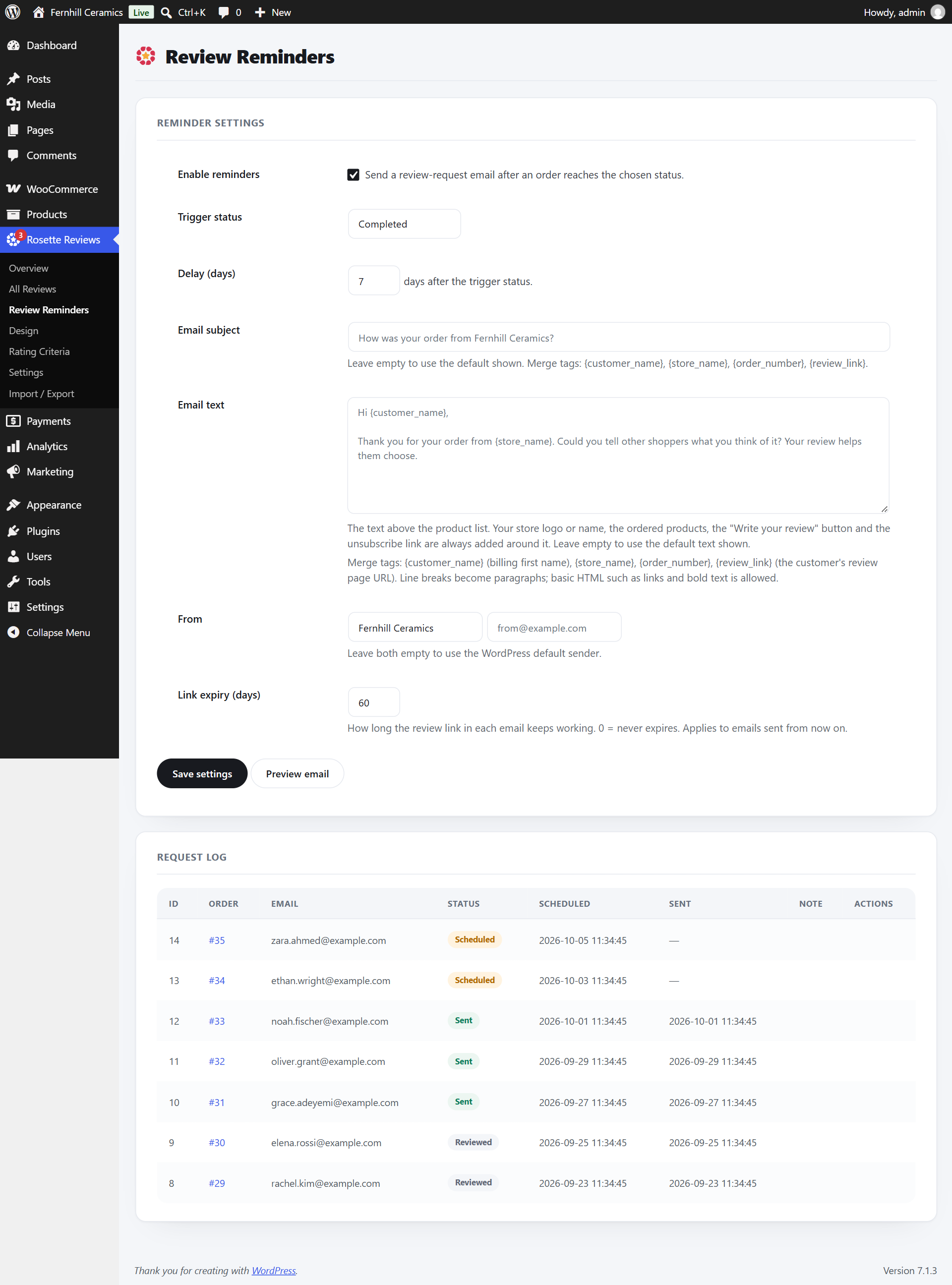
Review RemindersPick the order status and the delay, edit the email, and set how long the review link works. The request log sits below.
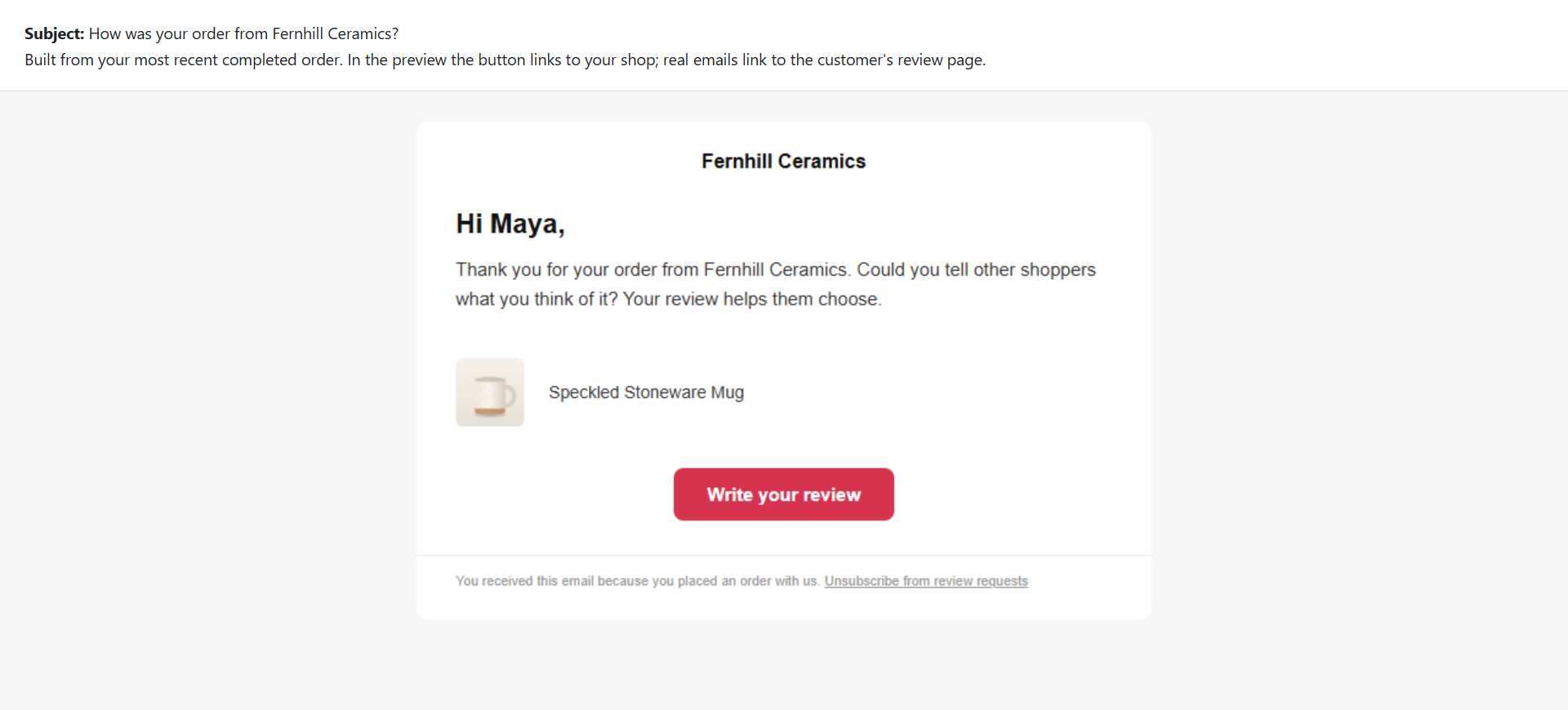
Email previewThe email carries your store name or logo, the products in the order, a review button and the unsubscribe link.
Show reviews
Product pages that answer a shopper’s questions before they leave.
Feature and what you getHow it worksFreePro
Rating summary
Shoppers see the average, the spread and how many buyers recommend the product in one glance.
Average, total, star bars with percentages (click a bar to filter), recommendation rate, verified-buyer count and a Write a review button. The form stays folded until a shopper opens it.
FreeIncluded
ProIncluded
Multi-criteria ratings
Shoppers see which part is good: quality, value, fit or service, each with its own score.
Customers rate the criteria you name, and each criterion gets its own bar in the summary. With Pro, a criterion can show only for chosen product categories, such as Fit for shoes and not for coffee, and every product keeps at least one rating that applies to it.
FreeUnlimited criteria
ProCriteria per product category
Review questions
Shoppers learn what a star rating can’t say, such as how a size fits.
Ask your own questions on every review form: a choice such as “How does it fit?”, short text or yes/no, optional or required. Answers show on the review, can be edited in moderation, and are included in CSV export and import and in privacy exports.
FreeUnlimited questions
ProUnlimited questions
Photo reviews
Customer photos answer the questions your product shots leave open.
Customers attach photos to their review. Visitors open them in a lightbox that works with the keyboard.
FreeIncluded
ProIncluded
Video reviews
Video shows size, fit and the product in use better than text can.
Shoppers can upload one MP4, WebM or MOV file, or paste a YouTube, Vimeo or other video link, on the product page and on the review page linked from your emails. Uploads are off until you turn them on, and only signed-in shoppers or shoppers from your emails can upload unless you allow guests. Files are checked before anything is saved, with a size limit you set, an hourly limit per shopper and for the whole site, and videos play right in the review. Link embeds are cached once and never fetched on each page view.
FreeNot included
ProIncluded
Filters and sorting
Shoppers find the reviews that answer their own question.
Filter by star rating, with photos, verified only and topic tags. Sort by most recent, highest, lowest or most helpful.
FreeIncluded
ProIncluded
Search inside reviews
Shoppers find the reviews that mention what they care about, such as “battery” or “size”.
A search box in the reviews tab on products with at least 10 reviews. It looks at the review text and titles only, never names or emails, highlights the matches, announces the number found, works with the star, photo and topic filters, and also works without JavaScript.
FreeIncluded
ProIncluded
Helpful votes
The reviews other shoppers found useful rise to the top.
One vote per visitor, deduplicated.
FreeIncluded
ProIncluded
Reviews marquee
Your home and landing pages show a moving strip of real reviews.
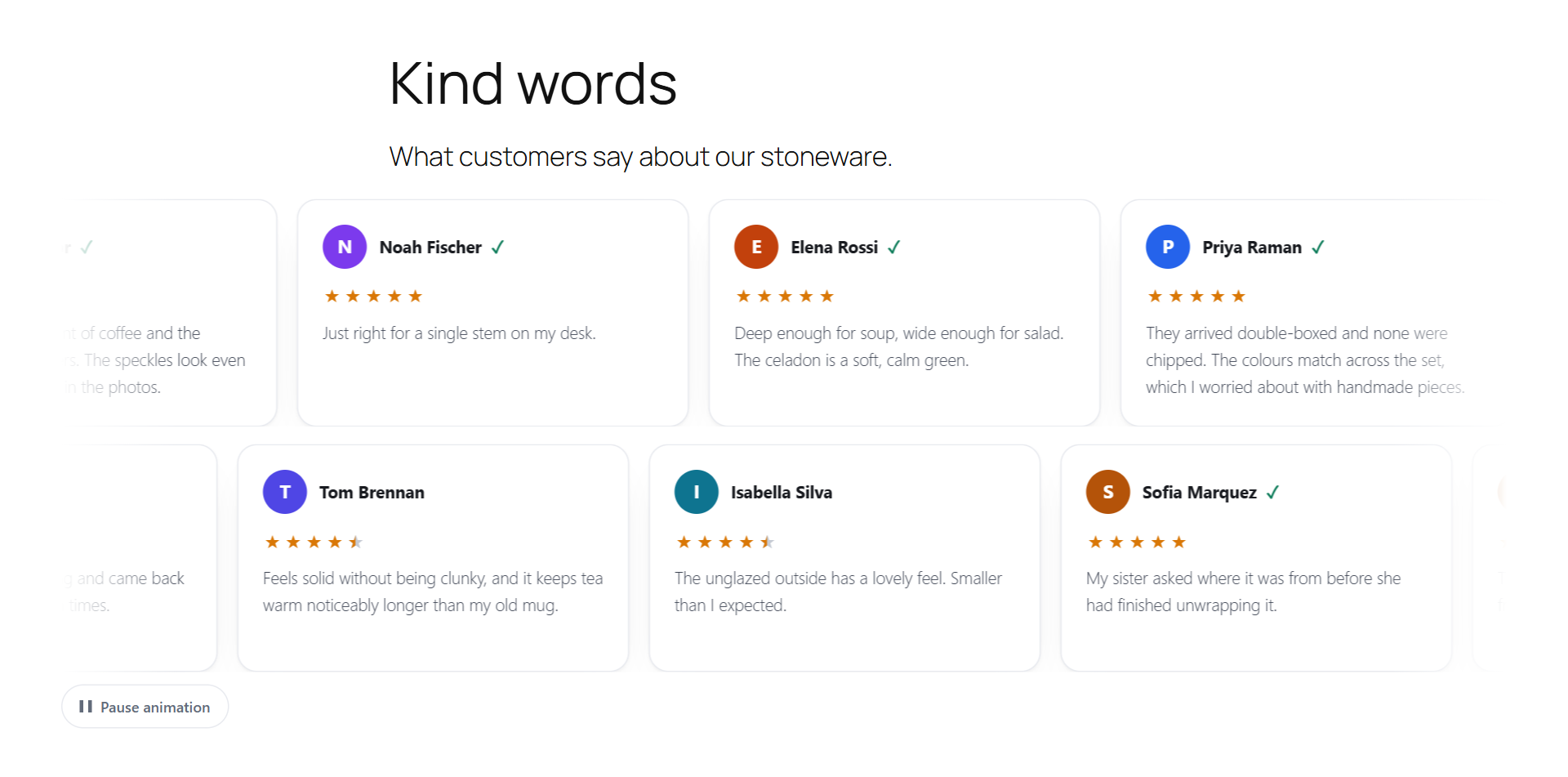
Scrolls left or right in one or two rows, with a pause button for visitors who want it still.
FreeIncluded
ProIncluded
Design settings with live preview
Reviews match your theme without writing CSS.
Accent colour, rating icon (stars, hearts, thumbs or emoji, with half states) and its colour, rating bar colour, list or grid, card style, font and text size. One setting covers the product tab, shortcodes, blocks and Elementor.
FreeIncluded
ProIncluded
Initials avatars
Review cards load no third-party images and send no visitor data to Gravatar.
Avatars are drawn on your server from the reviewer’s initials.
FreeIncluded
ProIncluded
How long after purchase
Shoppers can tell a first-day impression from a review written after weeks of use.
Verified reviews can show a quiet note such as “Reviewed 3 weeks after purchase”, worked out from the reviewer’s own paid order. It shows the same way on every verified review, whatever the rating, and you can turn it off.
FreeIncluded
ProIncluded
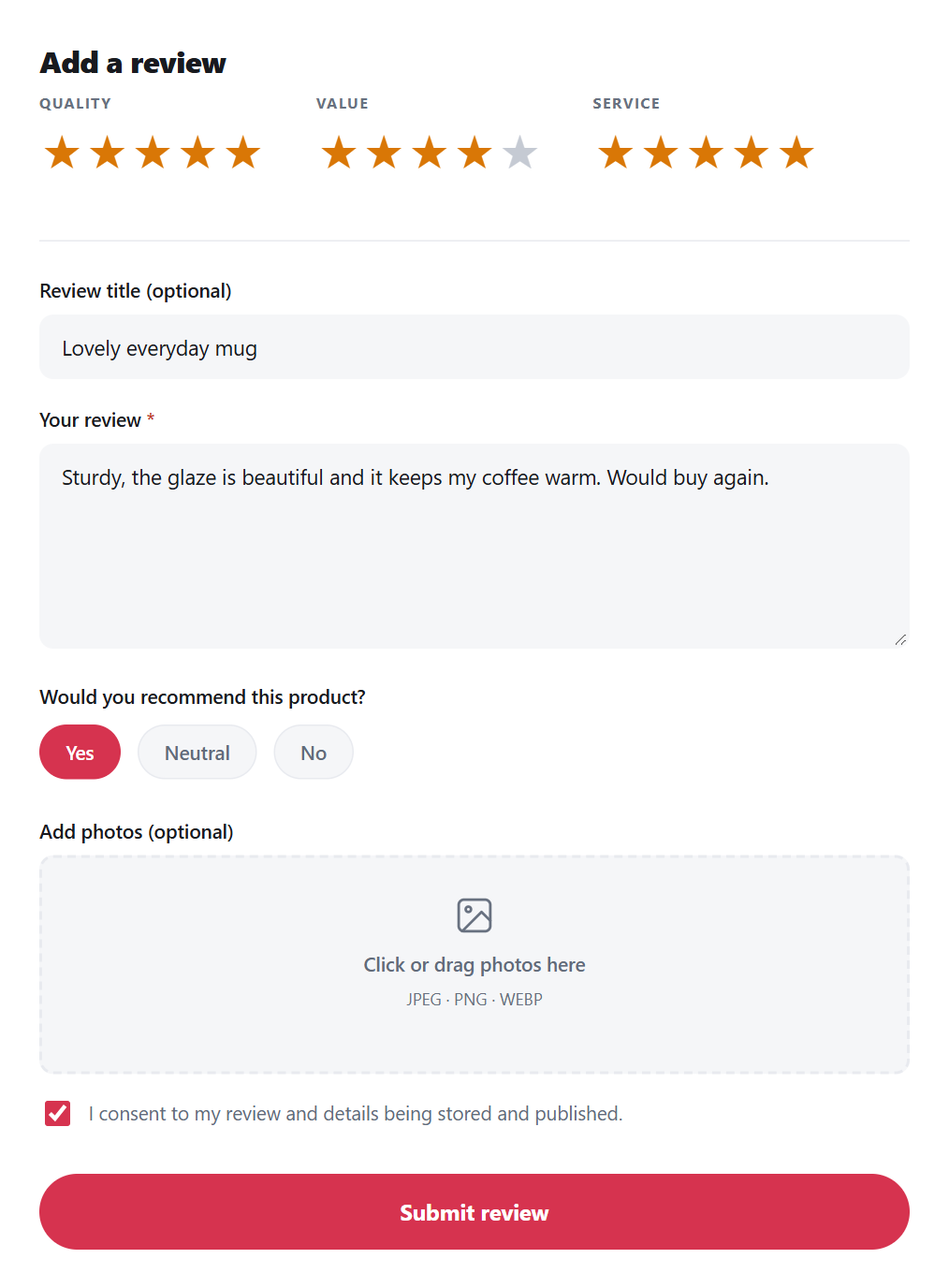
Review formCriteria stars, title, text, a recommendation, photos and the consent checkbox.
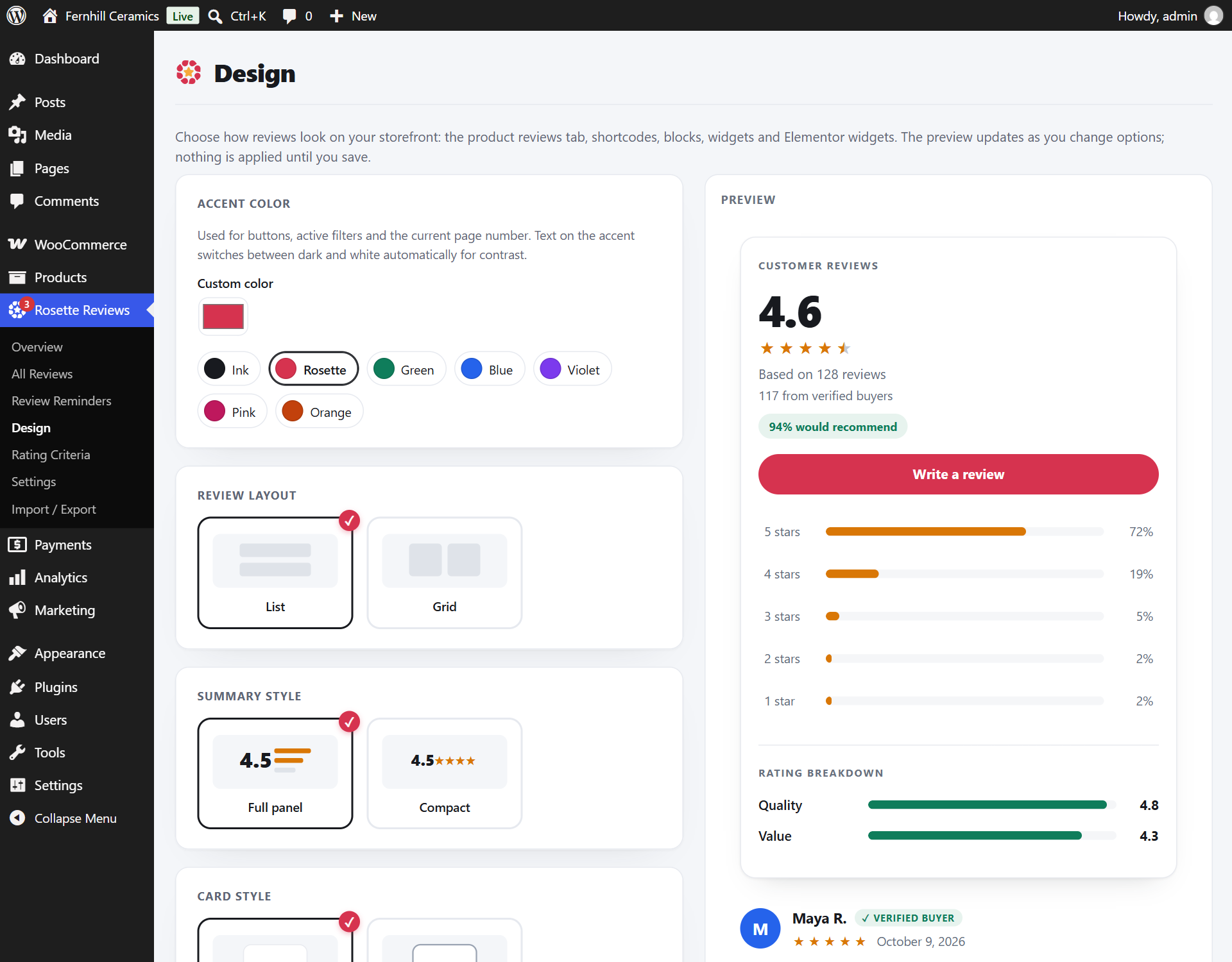
Design settingsAccent colour, layout, summary and card style, with a live preview that applies only when you save.
Search and trust
Markup search engines can read and badges shoppers can believe.
Feature and what you getHow it worksFreePro
Review structured data
Search engines read one consistent product with its rating, so you avoid duplicate rating markup.
Adds AggregateRating and Review data to WooCommerce’s own Product markup instead of printing a second Product. It can also fill in a GTIN (with its check digit verified), MPN and brand from fields you choose, only where WooCommerce or your SEO plugin left them out. Google decides whether to show review snippets.
FreeIncluded
ProPlus QAPage markup for Q&A
Verified buyer badge
Shoppers can tell reviews from real buyers apart from the rest.
Matched against the customer’s own orders, and set for every review sent through a signed reminder link.
FreeIncluded
ProIncluded
Spam protection
Keeps automated spam out without making real customers solve a puzzle.
A honeypot and a per-IP rate limit by default (skipped for signed links). Optionally one captcha with your own keys: Google reCAPTCHA v3, Cloudflare Turnstile or hCaptcha. Its script loads only where a visitor can submit a review, and the form waits for the check instead of failing a fast click.
FreeIncluded
ProPlus AI spam score and banned words
“How reviews work” notice
Shoppers see how you collect and check reviews, as EU and UK consumer law expect from stores that show them.
Off by default. A short note under your ratings, written from your own settings: how reviews are collected, what the verified label means and how you moderate. Also a shortcode and block for a policy page.
FreeIncluded
ProPlus sentences for coupon rewards, imports and list campaigns
Disclosure labels on rewarded reviews
Reviews written for a reward say so on the page, so shoppers can see which reviews were incentivised.
Rewarded reviews carry a disclosure label that stays even if the add-on that rewarded them is removed. Reviews posted through WordPress’s own comment form or other plugins always wait for moderation.
FreeIncluded
ProLabels on every display, REST, webhooks and the Google feed
Moderate and manage
One place in wp-admin to see what needs attention and act on it.
Feature and what you getHow it worksFreePro
Overview dashboard
One screen shows what needs your attention today.
A setup checklist, key numbers, the moderation queue, rating distribution, reminder statistics, and your most and least reviewed products.
FreeIncluded
ProIncluded
Fake-review checks on your own server
You see which new reviews deserve a second look, and why, without sending anything to another company.
Each new customer review gets a risk score from plain signals: several reviews from one connection or email in a day, text copied from another review, a form sent within seconds, very short text, a brand-new account, a throwaway email address, several links, or no verified purchase. The star rating is never part of the check. A Risk column explains every score, a High risk view collects them, and high-risk reviews wait for you even when an auto-approve rule would publish them.
FreeIncluded
ProIncluded
Product groups
Listings of the same product sold separately share one set of reviews, so no listing looks empty.
Group listings that are the same product, such as colours or pack sizes. Every listing shows all their reviews, each review says which listing it was written for, and a note names the listings. Listings must be in the same categories and you confirm they are the same product; removing a listing moves its reviews back.
FreeNot included
ProIncluded
Review health at a glance
You see where to ask for reviews next, not just how many you have.
The Overview shows the share of products with reviews (and lists those without), products that keep selling but have no review in the last year, how many recent low reviews got a reply, and whether your recent rating is slipping. It is worked out in the background, so the screen stays fast.
FreeIncluded
ProIncluded
Follow up on low ratings
You hear about an unhappy customer while there is still time to help.
An email reaches you when a review of 2 stars or lower arrives (choose 1 to 3, or off). The customer sees your support contact right after a low rating. Open a private case on any review, whatever its rating, keep a note and mark it resolved. None of this changes whether or when a review is published.
FreeIncluded
ProIncluded
Shoppers can report a review
You hear about fake, abusive or off-topic reviews from the people reading them.
A Report button on each review, with a reason and an optional note, one report per person. You get an email, a Reported view with the reasons, and every note on the review's edit screen. Off by default: hold a review for checking after a number of reports from signed-in shoppers or buyers. Nothing is deleted, and the rating never decides.
FreeIncluded
ProIncluded
Moderation and full editing
You fix typos, remove spam and undo mistakes without leaving WordPress.
Approve, unapprove, mark as spam, trash, restore, delete and search. Edit everything in a review, including criteria scores, title, tags and photos.
FreeIncluded
ProIncluded
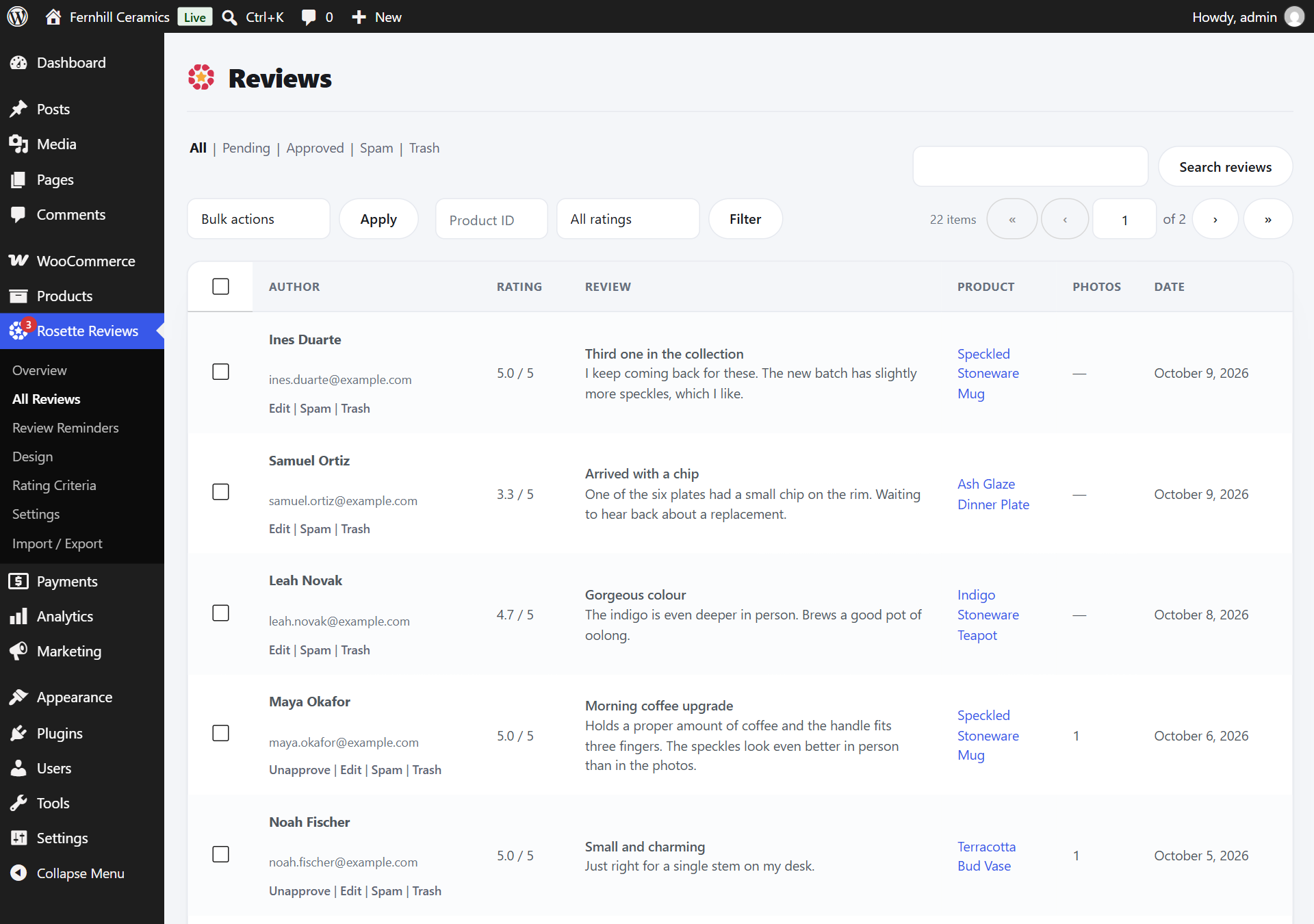
All ReviewsStatus views, filters and bulk actions. Open any review to edit its text, criteria, tags and photos.
Data, privacy and portability
Your reviews live in your database, and you can take them anywhere.
Feature and what you getHow it worksFreePro
Runs on your server
Customer and order data stays in your WordPress database.
No account to create, no API key and no sending quota. The only optional outside service is the captcha you choose (reCAPTCHA, Turnstile or hCaptcha), with your own keys.
FreeIncluded
ProAI and external sync only when you turn them on
Import WooCommerce reviews and CSV
You keep every review you already earned.
Brings in native WooCommerce reviews and CSV files, skips duplicates, and reports why any row was skipped.
FreeIncluded
ProPlus Judge.me, Yotpo and ReviewX files
Export to CSV or JSON
You can leave whenever you like and take everything with you.
Exports reviews in every status with criteria and photos. CSV output is safe against spreadsheet formula injection.
FreeIncluded
ProIncluded
GDPR export and erasure
You answer data requests from the WordPress privacy tools you already use.
A consent checkbox on forms, and an optional one at checkout. WordPress personal data export and erasure cover reviews, photos, questions and answers, the request log, link tokens, checkout consent answers and the unsubscribe list. Erasing a customer cancels requests still waiting to go out.
FreeIncluded
ProIncluded
Safe uninstall
Removing the plugin never takes your WooCommerce reviews with it.
Data removal is opt-in. Native WooCommerce reviews stay in place either way.
FreeIncluded
ProIncluded
Works with your site
Fits the editor, builder and WooCommerce setup you already run.
Feature and what you getHow it worksFreePro
Blocks, shortcodes, widgets and Elementor
You can place reviews anywhere your editor or page builder reaches.
ProPlus carousels, gallery, wall, badges and popup
HPOS and block checkout
It keeps working on current WooCommerce order storage and checkout.
Compatible with High-Performance Order Storage and the Cart and Checkout blocks.
FreeIncluded
ProIncluded
Loads only where needed
Pages without reviews stay as fast as they were.
Review CSS and JavaScript load only on pages that show reviews.
FreeIncluded
ProIncluded
Theme-overridable templates
Developers change the markup without forking the plugin.
Copy a file from the plugin’s templates folder into yourtheme/rosette-reviews/ and edit it.
FreeIncluded
ProIncluded
Reviews marqueeA block or shortcode for home and landing pages, with a pause button.
Engage customers
Pro: reply, reward and answer questions on the product page.
Feature and what you getHow it worksFreePro
Store replies
You answer a review in public, right under it, where the next shopper reads both.
Replies show beneath the review. With AI on, you can start from a suggested reply. Tick “Email the reviewer” and the customer gets one short email with your reply and a link straight to it. It goes only to an address you can trust (their account email, or the address your review request went to), never for imported reviews, and every email has an unsubscribe link.
FreeNot included
ProIncluded
Pin, highlight and top-reviewer badge
Your most useful reviews sit at the top, and regular reviewers get recognised.
Pin or highlight reviews, show a top-reviewer badge, and allow anonymous reviews.
FreeNot included
ProIncluded
Coupon rewards
Customers get a reason to review, and the reward never depends on the star rating.
Issues a single-use, expiring coupon, locked to the reviewer’s email, for a review from a paid order containing the product: when you approve it, or 7 days after it was written unless you rejected it with a reason such as spam. One coupon per order, a higher tier for photo or video reviews; staff-added and imported reviews never earn one. Reviews written under the offer are labelled “Offered a coupon for reviewing”.
FreeNot included
ProIncluded
Product questions and answers
You answer a pre-sale question once, on the product page, for every shopper who has it.
Questions, editable answers and votes, with moderation and restore. Single-question pages get QAPage markup. Shoppers can ask to be emailed when their question is answered: one email per question, for your answer. Guests get a link only, so a mistyped address reveals nothing. Questions are limited to five an hour per visitor.
FreeNot included
ProIncluded
AI with your own key
Pro: summaries, tags and replies through your OpenAI or Anthropic account.
Feature and what you getHow it worksFreePro
AI review summary
Shoppers get the gist of every review in one short paragraph.
Uses your own OpenAI or Anthropic API key. Regenerates after new reviews settle and backs off after a failed call.
FreeNot included
ProIncluded
Sentiment, spam score, tags and auto-publish
Moderation takes less of your time.
Scores sentiment and spam and adds topic tags. Can publish pending reviews that pass the spam check, whatever their rating or tone.
FreeNot included
ProIncluded
Reply suggestions and translation
You reply faster and serve shoppers in more languages.
Suggested replies, and translation limited to the languages you allow, within a daily budget you set. Imports never trigger AI calls.
FreeNot included
ProIncluded
Import, sync and send
Pro: bring reviews in from elsewhere and send requests through your email tool.
Feature and what you getHow it worksFreePro
Google and Facebook reviews
Reviews customers left on Google or Facebook appear next to your product reviews.
Google (with an API key, or a link-only aggregate) and Facebook. Sync skips duplicates, never invents ratings and never marks imported reviews as verified.
FreeNot included
ProIncluded
Importers for other review plugins
You switch from another plugin without losing your history.
Judge.me, Yotpo, ReviewX and generic CSV, with review photos (downloaded in the background), the store’s public reply, video links and the other app’s verified mark, shown as its own label such as “Marked verified on Judge.me”. Matches products by ID, then SKU, handle and title, and shows a preview before anything is written. Questions and answers import and export as CSV too.
FreeNot included
ProIncluded
Klaviyo, Mailchimp, Brevo and webhooks
You send the review link from the email tool you already use.
Pushes the review link to Klaviyo, Mailchimp (transactional contacts), Brevo or any webhook in the background, and respects unsubscribes.
FreeNot included
ProIncluded
Reminder steps, smart rules and past-order campaigns
Customers who bought before you installed the plugin get asked too, and every customer gets the same reminders.
A first email plus up to two reminders, each with its own delay, subject and text, that stop once the customer has reviewed everything. Smart rules on the first email, and a bulk campaign for past orders that asks each customer once and skips anyone emailed in the last 30 days.
FreeNot included
ProIncluded
Ask a list of customers
Customers who bought from you at a market stall, in a shop or on an old platform can review you too.
Upload a CSV (email, first name, products). The preview shows every row and why any is skipped, you confirm the sending statements, and requests go out in the background at the pace you choose. Reviews are marked verified only when that email bought the product on your store.
FreeNot included
ProIncluded
Google Shopping review feed
You can submit product reviews to Google Merchant Center.
An XML feed that validates against Google’s schema 2.4, flags incentivised reviews and respects anonymous reviews.
FreeNot included
ProIncluded
Widgets and sharing
Pro: more ways to put reviews in front of shoppers.
Feature and what you getHow it worksFreePro
Carousels, gallery, wall and badges
Reviews show up on more of your pages in the format each page needs.
Carousels, a photo gallery, a wall of reviews, a floating badge, a store rating badge, a social feed, and a popup that visitors can close or pause.
FreeNot included
ProIncluded
Share buttons, share cards and auto-post
Good reviews travel to your social channels.
Share buttons, generated share cards, and auto-posting to a Facebook page or a webhook.
FreeNot included
ProIncluded
Control, analytics and developer tools
Pro: rules, roles, reports and APIs for larger stores and agencies.
Feature and what you getHow it worksFreePro
Review analytics
You see whether ratings are rising or falling and what customers mention most.
Monthly volume and average, rating distribution and keywords, with CSV export.
FreeNot included
ProIncluded
Approval rules, banned words and gating
You decide what publishes on its own and what waits for you.
Auto-approve rules, whole-word banned words, verified-purchase gating, low-rating alerts and pooled reviews across product variations.
FreeNot included
ProIncluded
Review Manager role
Staff moderate reviews without access to your WooCommerce settings.
A dedicated capability for moderating reviews only.
FreeNot included
ProIncluded
REST API, signed webhooks and WP-CLI
Developers and agencies connect reviews to other systems and script routine jobs.
A read-only REST API for public products, signed webhooks with retries and a delivery log, and WP-CLI commands.
FreeNot included
ProIncluded
Start with the free plugin. Add Pro when you need it.
Pro installs on top of the free plugin and keeps every review and setting you already have.